


Meds & Pill Reminder MyTherapy
4.59.22K Reviews
App Specs
- Version
- 3.280.0
- Updated On
- License
- Free
- Downloads
- 5,000,000+
- Developer
- MyTherapy
- Categories
- Medical
- Platform
- Android, iOS
Screenshots



 Analysis by AppCompare
I find a medication reminder most useful when it answers a simple question at the right moment: did I take this already, or am I about to forget? MyTherapy is built around that everyday uncertainty, with tools for keeping a medication schedule and recording aspects of health in one place. I see its appeal less as a substitute for medical advice and more as a practical routine-keeper: it can help me stay organized, but I still need to make the decisions about my care with a clinician.
Where the app fits today
MyTherapy is a free medical app from developer MyTherapy. It has a 4.6 average from around 222,000 ratings, and more than five million installs. Those figures suggest that medication tracking is a familiar need for many people, but popularity alone would not make it right for every routine. The useful question is whether its mix of reminders and health notes matches the way you manage your own care.
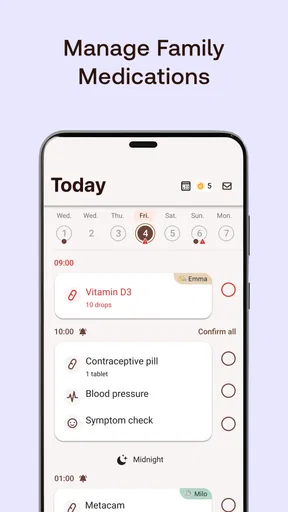
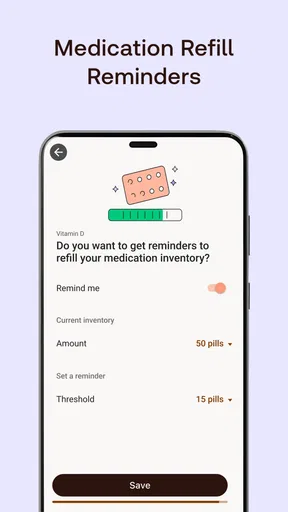
The basic idea is straightforward: enter the medicines you take, set a schedule, and use reminders to support your routine. A pill counter can also help you keep an eye on what remains, while mood tracking gives you a way to record how you feel alongside medication activity. That combination makes the app more useful than a bare alarm for someone who wants a modest record of their day, without turning every check-in into a full health-management project.
I would consider it especially suitable for someone who takes medicines at recurring times and sometimes loses track in the rush of the day. It can also be useful if you want a single place to note a dose and a mood change before discussing patterns with a healthcare professional. Someone managing only one uncomplicated daily tablet may find a phone alarm or a paper tick chart sufficient; the app earns its place when a schedule or recordkeeping need makes those simpler options feel scattered.
First Impressions and Setup
The first thing I noticed about Meds & Pill Reminder MyTherapy was its clean and intuitive design. Setting it up was a breeze, which is a relief because nobody wants to spend ages trying to navigate a confusing interface. After downloading the app, I was guided through the process of entering my medications, doses, and times. The app even has a database of medications, making it easier to find and input the exact one you’re taking. Nice touch!
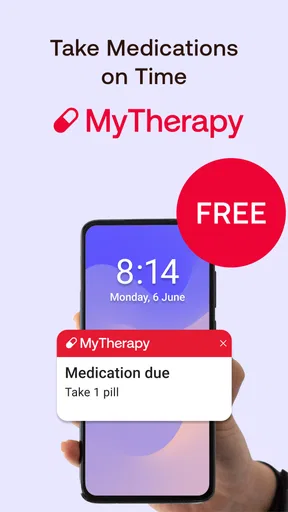
Another cool feature is the app’s ability to set up alerts and reminders. You can choose how you want to be reminded—whether it’s a simple notification or a more persistent alarm. Trust me, you won’t miss a dose with this app by your side.
Building a schedule that survives real life
A reminder only helps if the schedule reflects the instructions you actually follow. I would take care while entering each medicine and its timing, then review the finished schedule against the label or the directions from a clinician. A medication database can make searching and entry easier, but it should not be treated as a source for choosing a dose or resolving uncertainty. If the name or formulation is unclear, checking with a pharmacist is safer than guessing from a similar-looking result.
Worth Reading Before You Choose

Baby Panda World Brings Quick Play to Modern Phones, but Its Game Library Feels Busy

ESPN’s Live Game View Makes Following Close Games Easier

QuizzLand Review: A Good Fit for Short Trivia Breaks, Not Every Player

Basketball Stars: Multiplayer Is Fast, but Can It Recover When Matches Go Wrong?

WEBTOON Turns Phone Updates Into a Better Reading Routine

Link to Windows Runs on Shared Habits, Not Social Feeds
One useful habit is to set the schedule around the routine that already anchors your day, rather than an idealized timetable. For example, if a dose belongs with breakfast, I’d choose a reminder time that fits when breakfast usually happens, then adjust for days when that routine changes. For medicines with specific food or timing instructions, those instructions come first; a convenient notification should never override them.
There is also a practical distinction between being reminded and being medically supervised. MyTherapy can help me remember what I have planned, but a notification cannot determine whether a dose is safe after a missed one, whether a medicine should be stopped, or whether a new symptom needs urgent attention. Those questions belong with a doctor or pharmacist. Keeping that boundary clear makes the app a better companion rather than asking it to do a job it was not designed to do.
Features That Stand Out
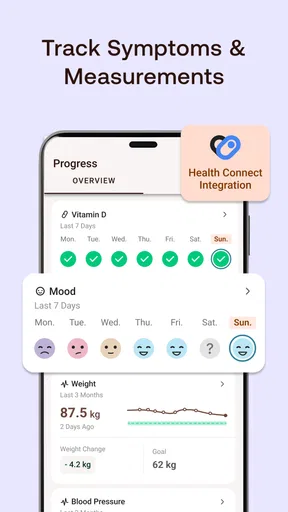
One of the standout features is the comprehensive health journal. It doesn’t just stop at reminders; it allows you to log your symptoms, mood, and even vital measurements like blood pressure. This makes it super handy for people who need to keep track of more than just their medication.
The app also has a sharing feature. You can share your progress and logs with your doctor or family, which is especially useful if you need someone else to be in the loop about your health. It’s like having a digital health diary that you can easily update and share.
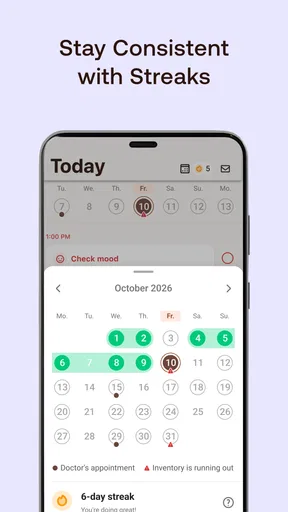
And let's not forget the motivational aspect. The app encourages you with progress reports and streaks, which can be surprisingly motivating. Who knew taking your meds could feel like leveling up in a game?
Making the journal useful, not burdensome
The journal is most valuable when I use it to capture information that would otherwise be hard to recall later. A brief note about a symptom, mood, or measurement can help me describe a week more accurately than trying to reconstruct it from memory at an appointment. I would keep entries concise and consistent: note what changed and roughly when, rather than writing a long account every time. That makes the record easier to maintain and easier to explain to someone else.
There is a trade-off, though. Tracking more categories can create a fuller picture, but it also adds work, and a long unmaintained log is not automatically more informative. I’d start with the one or two things I genuinely want to observe, such as whether a symptom keeps recurring or how mood varies, and expand only if the notes prove useful. The app can organize observations; it cannot establish that a medicine caused a change. I would treat patterns as questions to raise with a clinician, not as a diagnosis.
Sharing can make those notes easier to discuss, particularly when I want a family member or doctor to see a concise record rather than rely on my memory. I’d still think carefully about what I choose to share and with whom, because health notes are personal. Before relying on any shared record for an appointment, I would make sure the relevant entries are current and easy to interpret. The benefit is preparation and communication, not replacing a conversation or clinical record.
A realistic day with reminders
Imagine a person who takes a medicine in the morning and another later in the day, but whose work routine changes. The morning alert can act as a prompt before leaving home, while the later reminder helps them pause and check their plan rather than trying to remember it during a busy afternoon. If they record a symptom or mood change, they can add a short note while the detail is fresh. At the end of the week, that record may help them explain what they noticed at a medical appointment.
The key is to decide how to handle a reminder when life interrupts. If I’m unsure whether I took a dose, I should not use an app’s notification or pill count as permission to take another one. I would follow the medicine’s instructions or ask a healthcare professional. A tracker can reduce ordinary forgetfulness, but it cannot safely resolve every missed-dose situation. That is an important limitation for anyone expecting a reminder app to make medication decisions for them.
How it compares with simpler alternatives
Compared with a standard phone alarm, MyTherapy is more organized for people who want medication entries and a record of health observations together. An alarm is quicker to set up and can be enough for a stable, uncomplicated routine, but it usually does not provide the same medication-focused context or a place to pair reminders with journal entries. A paper chart has the advantage of being visible without opening a phone, though it takes manual upkeep and may be less convenient to review or share.
For someone already using a detailed health platform or receiving medication support from a clinician, adding another tracker could create duplicated work. I would avoid entering the same information in multiple places unless there is a clear benefit, and I would decide which record is the one I keep current. MyTherapy makes the most sense when its reminders, pill-counting, and mood or health logging solve a real organizational problem rather than simply adding another screen to check.
Daily Use and Performance
In daily use, the app shines with its reliability. The reminders are timely and adjustable to fit your schedule, and the interface remains smooth and responsive. I never experienced any lags or crashes, which is a huge plus because keeping track of medications is too important to be left to a buggy app.
One small hiccup I noticed is that inputting new medications could use a bit more automation for recurring prescriptions. It’s a minor gripe, but a recurring medication could ideally just roll over without needing manual input each time.
Limits worth knowing before you depend on it
Even a well-organized schedule needs occasional maintenance. A prescription can change, a medicine can be paused, or the times you take it can shift. When that happens, I’d update the entry promptly and check that the old reminder is no longer part of the routine. The manual effort around adding or renewing medicines is a real friction point, especially for people with frequent prescription changes. If the list is complex, a careful setup and regular review matter more than trusting the app to stay accurate on its own.
Notifications also depend on a phone being available and set up to deliver them. I would not make a medication plan depend entirely on a single digital prompt, particularly for a medicine where a missed or duplicated dose could be consequential. A backup such as a written schedule or support from a caregiver may suit some people better. That does not make the app pointless; it means the right level of backup depends on the person and the medication routine.
The app is not the right fit if what you need is medical advice, prescription management by a clinician, or automatic decisions about missed doses. It is also less compelling if you dislike entering information or know that you will ignore repeated alerts. In those cases, a simpler alarm, a visible paper checklist, or a conversation with a healthcare professional about practical support may work better than adding a tracker you will not maintain.
What the version history can—and cannot—tell you
The current version is 3.253.0, and the app first appeared on April 14, 2015. That long span gives existing users a reason to expect an established product rather than a brand-new experiment, but a version number by itself does not explain which functions changed or how an individual update affects a routine. I would check the app’s current behavior after an update, especially the medication list and reminder schedule, rather than assume that an update has preserved every personal setting exactly as I expect.
For someone already using it, the practical approach is to keep the medication plan accurate and verify reminders after making any changes. For a new user, the current version is the one to judge: set up a small, representative schedule first, confirm that the alerts arrive as intended, and then add further tracking if it genuinely helps. The app is free to download, with optional in-app purchases priced from $1.99 to $49.99 per item. It is rated for Everyone, and its minimum operating-system requirement is version 8.0.
What I would watch over time is whether the app continues to make routine maintenance manageable: adding a changed prescription, keeping the schedule clear, and making health notes easy to review. Those are the areas that affect day-to-day usefulness more than an impressive feature list. I would also keep my expectations grounded: an update may improve the experience, but only confirmed changes should be treated as evidence of new capabilities. The most important test is whether the reminders and records remain dependable for the way I actually manage my health.
End Note
Overall, Meds & Pill Reminder MyTherapy is a solid choice for anyone needing a reliable way to manage their medications and health logs. It’s not just an app; it feels like a partner in managing your health. Whether you’re managing a complex medication schedule or just trying to remember to take vitamins, this app has got you covered.
If you’re someone who forgets to take their meds or just wants an easier way to manage them, give this app a shot. It’s like having a little helper in your pocket, always ready to remind you and keep you on track. I’d say it’s worth the download.
Pros
- User-friendly interface for all ages.
- Comprehensive medication tracking features.
- Customizable reminders for flexibility.
- Supports health diary and mood tracking.
- Syncs seamlessly across multiple devices.
Cons
- No option for manual data backup.
- Limited support for non-standard medications.
- Ads can be intrusive for free users.
- Requires internet for some features.
- No integration with all fitness trackers.
FAQs for Meds & Pill Reminder MyTherapy
What features does Meds & Pill Reminder MyTherapy offer?
Meds & Pill Reminder MyTherapy offers a comprehensive set of features to help manage your medication schedule. It includes medication reminders, a built-in health journal, progress reports, and the ability to share your information with healthcare providers or family members. The app also supports tracking various health measurements and symptoms.
Is Meds & Pill Reminder MyTherapy free to use?
Yes, Meds & Pill Reminder MyTherapy is free to download and use. However, it may offer in-app purchases or premium features that provide additional functionality. Users can enjoy the core features without any cost, making it accessible for those who need basic medication management.
Can I use Meds & Pill Reminder MyTherapy for multiple users?
Meds & Pill Reminder MyTherapy is primarily designed for individual use to help users manage their own medication schedules. However, you can manually add another user’s information to the app for personal management, but it may not support simultaneous tracking for multiple users as effectively as dedicated multi-user apps.
How does Meds & Pill Reminder MyTherapy handle data privacy?
Meds & Pill Reminder MyTherapy places a strong emphasis on data privacy. The app complies with relevant privacy laws and uses encryption to protect your personal information. Users can review the app’s privacy policy to understand how their data is stored and shared, ensuring transparency and security.
Is Meds & Pill Reminder MyTherapy available on both Android and iOS?
Yes, Meds & Pill Reminder MyTherapy is available for both Android and iOS devices. Users can download it from the Google Play Store for Android devices and the Apple App Store for iOS devices, ensuring wide accessibility for smartphone users. Regular updates help maintain compatibility across different versions.


